
# What is the TestFlight version of Tachimanga
TestFlight version is the beta version of Tachimanga, which includes new features, bug fixes, and weekly updates. It allows you to access all the new features earlier.
# How to get a TestFlight slot
If you have subscribed to the premium, you can get a reserved TestFlight slot during the subscription period, granting you early access to all new features.
You can request your TestFlight invite using the form below.
# Request TestFlight Invite
# How to find your Apple Order ID
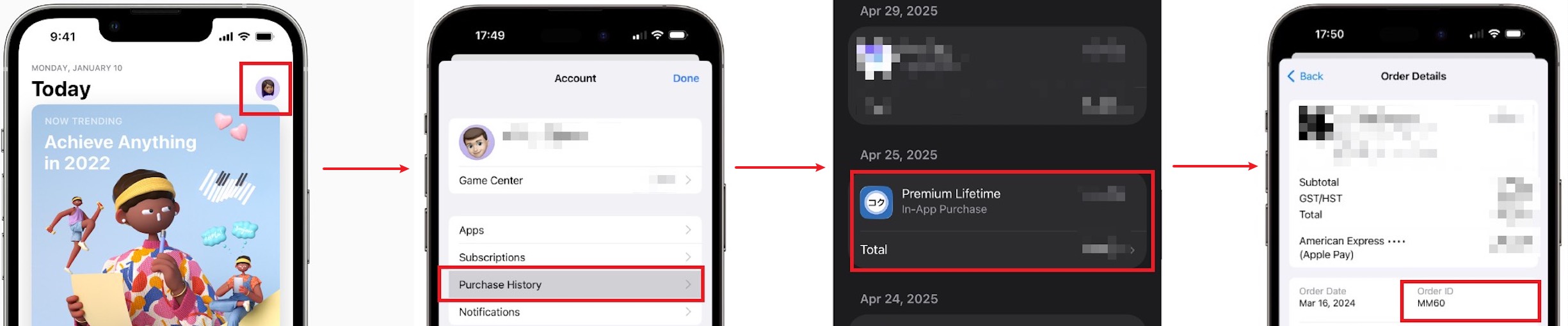
To find your Apple Order ID, follow these steps:
- Open the App Store app.
- Tap the your photo at the top of the screen.
- Tap Purchase History to see your purchases. You might be asked to sign in.
- Find Tachimanga in the list, tap it to open the details page, and you'll see your Apple Order ID there.
You can also find the order id in the in-app purchase receipt email Apple sends you.
If you can't find it, please watch the video tutorial (opens new window).
# FAQ
# What should I do if TestFlight asks for a Redeem code?
If TestFlight asks for a Redeem code, simply close TestFlight and click on the TestFlight link again.
# What can I do if the TestFlight one has expired?
Don't worry, each update extends the expiration for 90 days. Even if it expires, you can simply download the App Store version to replace it, and all your data will be preserved.
# Will installing the TestFlight one result in any data loss?
No, there won't be any data loss when installing the TestFlight one.
# Is the TestFlight version stable?
The goal of TestFlight versions is to test new features. They have a high update frequency but may be less stable. Please provide feedback if you encounter any issues. Severe issues are generally fixed within one to two days. TestFlight also allows you to revert to a previous version if you encounter severe issues.
# Is there a relationship between the Apple ID in TestFlight and email that receives the invitation?
The associated Apple ID is determined by the App Store account currently logged into on the iOS device that clicks on the invitation email, and it has nothing to do with the email(i.e., the email receiving TestFlight invitations).
However, we strongly recommend binding with an Apple ID that matches your email. Accepting an invitation with a mismatched Apple ID may lead to anomalies when unbinding later (this is an issue on Apple's server side).
# How many slots can one order get?
The slot is bound to the Apple ID that accepts the invite. One order can only get the invite link once.
# What if I don't receive the TestFlight invitation email?
Invitation emails are sent by Apple's servers, and some email accounts may have difficulty receiving them. Be sure to check your spam folder and make sure your inbox isn’t full. If you still haven’t received the invite link within 15 minutes, you can try using a different email. Please note that each order allows only one email change.