
# 2025 Black Friday Deal:
- Lifetime Premium: 30% OFF (Ends Nov 30)
- Annual Subscription: 30% OFF First Year (Ends Nov 30)
# How to Get the Discount:
If you are using the TestFlight version of Tachimanga, please check the TestFlight notes below before proceeding.
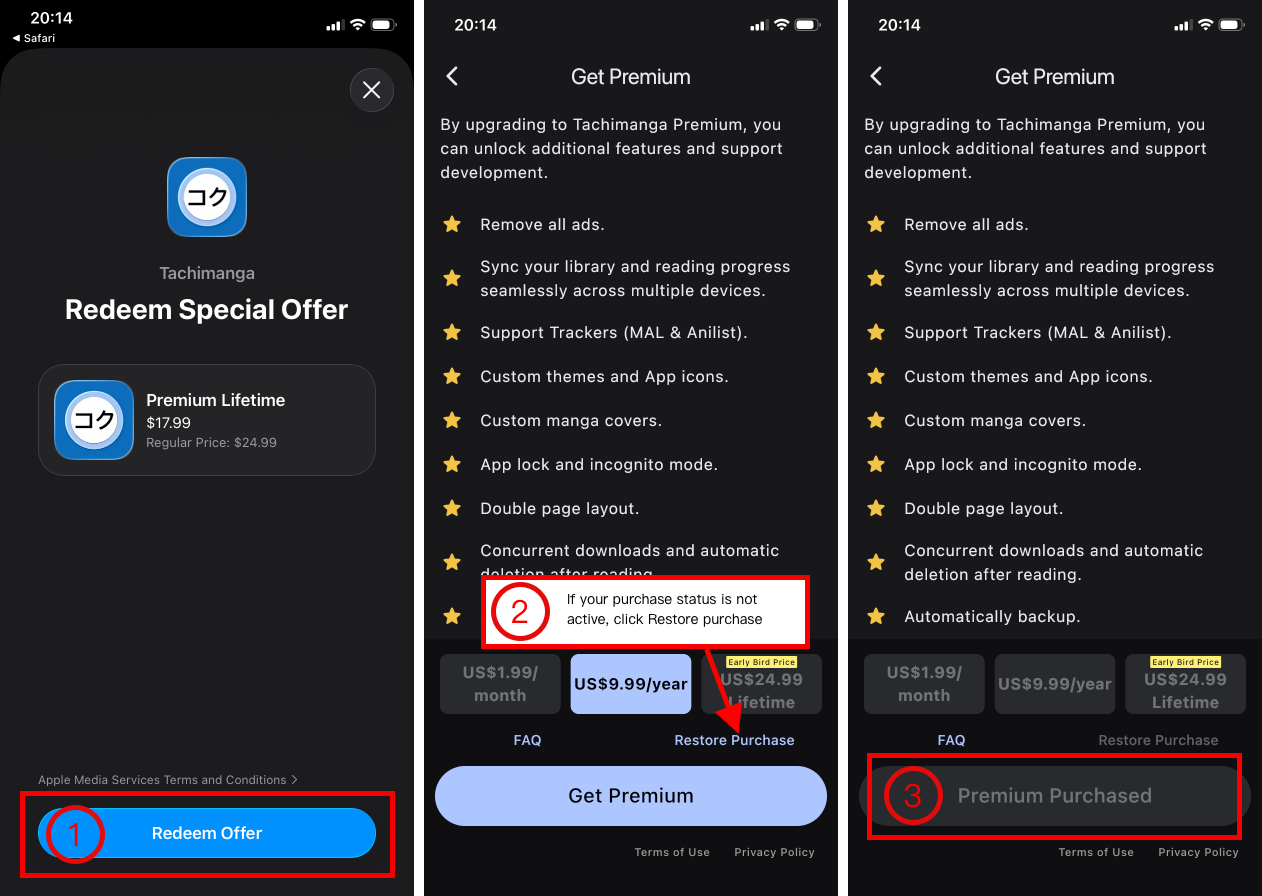
- Tap a link below to purchase on the App Store.
- Lifetime Premium 30% OFF : https://apps.apple.com/redeem?ctx=offercodes&id=6447486175&code=BF2025 (opens new window)
- Annual Subscription 30% OFF First Year: https://apps.apple.com/redeem?ctx=offercodes&id=6447486175&code=BF2025A (opens new window)
- Open Tachimanga, go to
More->Get Premium->Restore Purchase.- If your purchase status is already active, no need to restore.
- For multiple devices, perform "Restore Purchase" on each one.
- Done! Premium is now active.
# FAQ:
Why is my price higher than 30% OFF?
The final price is converted by Apple based on your local currency. The reference USD prices are:- Lifetime: $17.99 (was $24.99)
- Annual: $6.99 (was $9.99)
Does this offer support Family Sharing?
Yes.How do I upgrade from a subscription to a lifetime plan?
Direct upgrades are not available. You can purchase the lifetime plan directly (it's a great price!). Remember to cancel your subscription (opens new window) to avoid future charges.The app still shows my old subscription after I upgraded.
This is a known display issue. Your lifetime premium is active. It should resolve after reinstalling the app or with the next update."Restore Purchase" is stuck.
If you are using the TestFlight version of Tachimanga, please check the TestFlight notes below.- Try reinstalling the app (remember to create a backup before deleting the app, then export and save it elsewhere), switch your network, and try again.
- If the issue persists, feel free to contact us via email at tachimangaapp[at]gmail.com
- You can also request a refund directly from Apple: Request a Refund (opens new window). We apologize for the inconvenience.
# TestFlight Version Notes:
If you are using the TestFlight version of Tachimanga, please follow the steps below:
- Create a backup, then export and save it elsewhere.
- Download Tachimanga from the App Store to replace the TestFlight version. (All your data will be preserved.)
- Follow the tutorial above to complete your discounted purchase and restore.
- Reinstall the TestFlight version of Tachimanga.
If you are unable to restore your purchase, please strictly follow the steps below:
- Create a backup, then export and save it elsewhere.
- Completely delete Tachimanga. (Note: All your downloads will be deleted.)
- Download Tachimanga again from the App Store.
- Follow the tutorial above to complete your discounted purchase and restore.
- Reinstall the TestFlight version of Tachimanga.
- Restore the backup.