
# 2026 Black Friday Deal:
- Lifetime Premium: Special Offer (Ends November 30, 2026)
- Annual Subscription: Special Offer (Ends November 30, 2026)
# How to Get the Discount:
If you are using the TestFlight version of Tachimanga, please check the TestFlight notes below before proceeding.
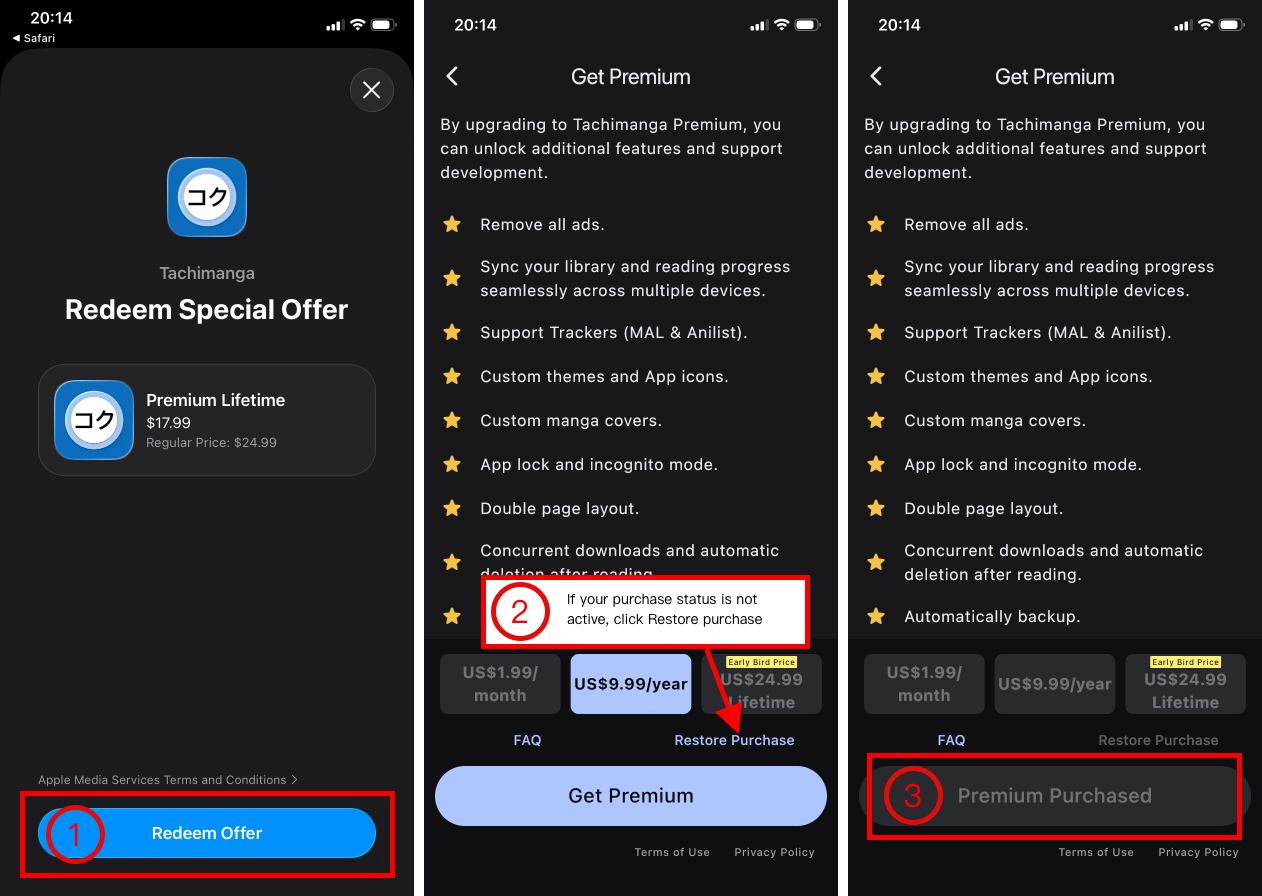
- Tap a link below to purchase on the App Store.
- Open Tachimanga, go to
More->Get Premium->Restore Purchase.- If your purchase status is already active, no need to restore.
- For multiple devices, perform "Restore Purchase" on each one.
- Done! Premium is now active.
# FAQ:
Can I use Premium on multiple devices?
Yes. Install Tachimanga on each device using the same Apple Account that made the purchase. Open Get Premium and tap Restore Purchase on each device. You will not be charged again.
Why does the redemption link ask me to install the app or say the offer is unavailable?
Switch the App Store to the Apple Account you used to download Tachimanga, then open the redemption link again.
Why does the discount look different in my region?
Prices vary by App Store region and currency, so the discount in your region may differ from 30%. The reference prices in USD are:
- Lifetime: $17.99 (regularly $24.99)
- Annual: $6.99 (regularly $9.99)
Please check the final price shown by Apple before confirming your purchase.
Does this offer support Family Sharing?
Yes. See our Family Sharing guide for setup and troubleshooting.
Can I switch from a subscription to Lifetime?
You can purchase Lifetime using the offer above. Buying Lifetime does not automatically cancel your existing subscription. Please cancel it separately (opens new window) to avoid future renewal charges.
Q: I purchased Lifetime, but the app still shows my old subscription.
This is a known display issue. Your Lifetime Premium should still be active. Check again in a few days; the display should refresh. Also, remember to cancel your annual or monthly subscription (opens new window) to avoid future renewal charges.
I was charged, but Premium is not active. What should I do?
Make sure Media & Purchases is signed in with the Apple Account used for your purchase, then try Restore Purchase. If you use the TestFlight version, follow the TestFlight instructions below.
What if Restore Purchase gets stuck?
Restart your device, try a different network, then restore again. Before reinstalling, create a backup and export it to a safe location. If the issue persists, contact us at tachimangaapp@gmail.com. You can also request a refund from Apple (opens new window).
# TestFlight Version Notes:
If you are using the TestFlight version of Tachimanga, please follow the steps below:
- Create a backup, then export and save it elsewhere.
- Download Tachimanga from the App Store to replace the TestFlight version. (All your data will be preserved.)
- Follow the tutorial above to complete your discounted purchase and restore.
- Reinstall the TestFlight version of Tachimanga.
If you are unable to restore your purchase, please strictly follow the steps below:
- Create a backup, then export and save it elsewhere.
- Completely delete Tachimanga. (Note: All your downloads will be deleted.)
- Download Tachimanga again from the App Store.
- Follow the tutorial above to complete your discounted purchase and restore.
- Reinstall the TestFlight version of Tachimanga.
- Restore the backup.